Description
Learn & Play by Fisher-Price is an activity collection for toddlers rather than a conventional game. Familiar songs, simple touch interactions, and parent-child play are approachable, though subscription terms, content availability, and device supervision deserve adult review.
Learn & Play by Fisher-Price Review
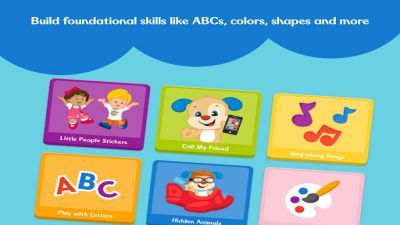
Learn & Play by Fisher-Price is designed for very young children and should be judged as a guided early-learning app rather than a score-driven game. Its activities use songs, short videos, familiar characters, and large touch targets to introduce topics such as letters, numbers, shapes, colors, routines, and simple cause and effect. The strongest use is shared play.
A parent can name what appears on screen, repeat a song away from the device, ask the child to find a color, or connect an activity to a physical toy. The app's simple navigation helps toddlers participate, but an adult still provides the context that turns tapping and watching into a useful learning exchange. Content is intentionally repetitive because young children learn through recognition and practice.
That repetition may reassure a toddler while feeling limited to an older child. The app should not be treated as a replacement for conversation, books, movement, or hands-on play. Screen-time recommendations and the child's response matter more than finishing every activity.
Availability has changed during the product's long history, including publisher and subscription arrangements, so families should inspect the current store page before installing. Check which activities are included, whether a trial converts to a paid plan, what can be downloaded, and how personal data is handled. As a supervised activity library, Learn & Play can support a short routine.
Its value depends less on rewards and more on how adults extend the ideas beyond the screen.
Base Info
Official Sources
LumenPlays points players to official store and publisher pages where available. Use these links to review current pricing, availability, privacy details, and device requirements.
Screenshots
How to Play Learn & Play by Fisher-Price
An adult should open the app first, review the current subscription or account screen, and select content appropriate for the child's age and interests. Begin with one short song, story, or activity rather than presenting the entire library. Let the child tap the large visible objects and observe the response.
Describe the action aloud: name the animal, repeat the sound, count the objects, or identify the color. If the activity uses a song, pause afterward and repeat part of it together without the device. Use the app in brief supervised sessions.
Switch activities when attention drops rather than pushing for completion. For two-person play, take turns choosing an item or copying an action shown on screen. Connect digital prompts with physical examples nearby, such as finding another circle in the room.
Before travel, check whether selected content can be downloaded and opened without a connection. Keep purchases protected with the device password and review privacy permissions. When the session ends, move to an off-screen activity that reinforces the same idea, such as sorting blocks, drawing a shape, or reading a related picture book.
Pros
- Large touch targets suit very young users.
- Songs and characters encourage recognition.
- Activities can prompt useful parent-child conversation.
- Short segments fit a limited screen-time routine.
Cons
- It is not a substitute for hands-on learning.
- Older children may outgrow the simple repetition quickly.
- Current content and subscription access require careful review.
Beginner Tips
- Review subscriptions and permissions before giving the device to a child.
- Start with one short activity at a time.
- Name and discuss what happens on screen.
- Use device purchase controls and supervised profiles.
- Follow screen activities with physical play.
FAQ
Is Learn & Play by Fisher-Price a traditional game?
No. It is a collection of early-learning videos, songs, and simple interactive activities for young children.
Should a toddler use the app alone?
Adult supervision is recommended so activities can become conversations and purchases, permissions, and screen time remain controlled.
Does all content work offline?
Offline access depends on the current version and downloaded content, so parents should test selected activities before traveling.
Is the app free?
Access terms can change and may include trials or subscriptions; the current App Store or Google Play listing should be checked before installation.
Similar Games